Collaborative editing is the star of the show, but the editor contains other features worth exploring.
Inserting the Current Date and Time
Type @today or its alias @date followed by a space or punctuation to insert the current UTC date using Ghostwriter’s configured date
format. For example, with the default format, @today, becomes 21 Jul 2026,. Type @now or its alias @time the same way to insert
the current time in UTC, such as 20:14:13 UTC. The inserted values are ordinary text and do not change afterward. The shortcuts are
disabled inside inline code and code blocks.
Inserting Objects
The editor supports inserting objects that make it easier to visualize certain elements of your writing, such as captions and evidence files.
Inserting Evidence
You can insert your uploaded evidence files by clicking the paperclip in the menu bar. A window will appear with options to select an existing
piece of evidence from a list or upload a new piece of evidence.After inserting your evidence, a preview block will appear in the editor so you can see the evidence you have inserted and understand how it
will look in line with your other content.
Inserting Captions
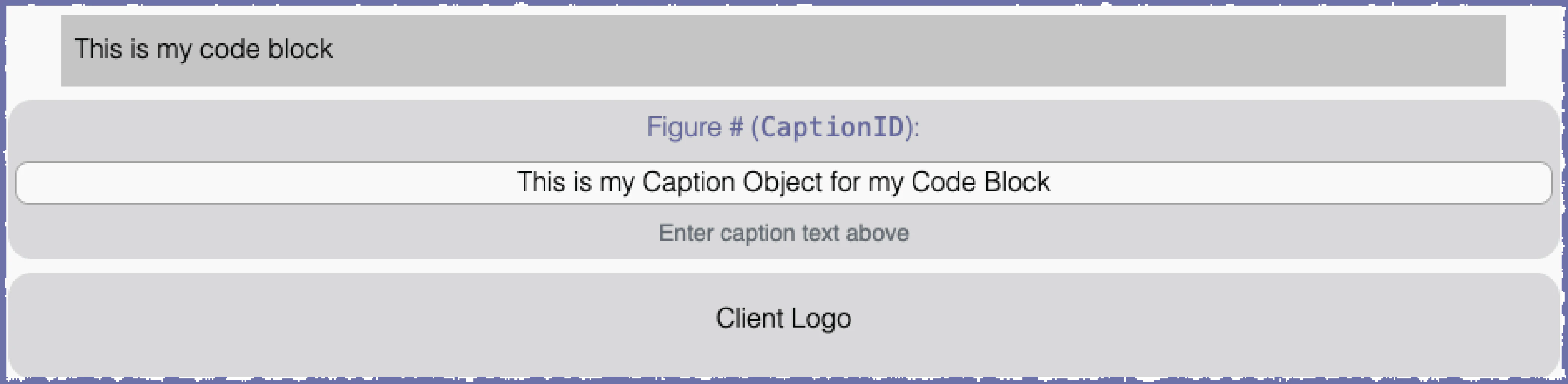
You can insert a caption by clicking the hamburger menu and then Insert Caption. The form will ask you to enter a reference name. A custom
reference name is optional, but you will want one if you plan to create a reference/bookmark to your caption later. After inserting the caption,
you will edit the text field to supply the contents of your caption.
Passive Voice Checking
The Ghostwriter image ships with a local copy of the English spaCy model, a natural language processor with the
capability to detect passive voice. Editors often have to flag instances of passive voice when reviewing reports written in languages
such as English. Language processing happens on demand.
Performing a Passive Voice Check
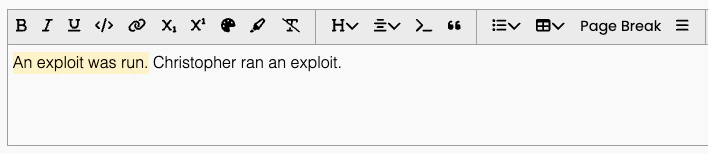
Click the hamburger menu and then Check Passive Voice. The local spaCy model will review the text and try to highlight
any instances of passive voice. The model has about 95% accuracy.
After highlighting instances of passive voice, you can clear the highlighting by editing that section.
Changing the Language
Ghostwriter ships with en_core_web_sm. You can change the language model using Ghostwriter CLI. SpaCy offers trained pipelines for a couple dozen languages and an option
for a multi-language model.After you change the model, bring the containers down and back up. Ghostwriter will check if your desired model is downloaded at runtime.
If the model is not downloaded, such as when you have just changed it, it will download the model. This adds a one-time delay of about 20-30 seconds
to the service’s start time.
./ghostwriter-cli config set spacy xx_ent_wiki_sm./ghostwriter-cli down && ./ghostwriter-cli up
.\ghostwriter-cli config set spacy xx_ent_wiki_sm.\ghostwriter-cli down && .\ghostwriter-cli up
./ghostwriter-cli config set spacy xx_ent_wiki_sm./ghostwriter-cli down && ./ghostwriter-cli up
{"docsConfig":{"theme":"mint","$schema":"https://mintlify.com/docs.json","name":"Ghostwriter Documentation","colors":{"primary":"#6D70A7","light":"#50B071","dark":"#6D70A7"},"logo":{"light":"https://mintcdn.com/specterops-2/rwxeaHvw9J2xZp6c/logo/light.svg?fit=max\u0026auto=format\u0026n=rwxeaHvw9J2xZp6c\u0026q=85\u0026s=7ba094d2f43cc72c0ed5bb0feedd46c2","dark":"https://mintcdn.com/specterops-2/rwxeaHvw9J2xZp6c/logo/dark.svg?fit=max\u0026auto=format\u0026n=rwxeaHvw9J2xZp6c\u0026q=85\u0026s=6d58f4692c9f7bfc4c03ea8f7db37fe3","href":"https://specterops.io/"},"favicon":"https://mintcdn.com/specterops-2/hxAceaiaqVHSIa3R/favicon.png?fit=max\u0026auto=format\u0026n=hxAceaiaqVHSIa3R\u0026q=85\u0026s=146677961412d6ff71d73e719e1c6c60","appearance":{"default":"light","strict":false},"background":{"decoration":"gradient"},"navbar":{"links":[{"href":"https://blog.getghostwriter.io/","label":"Learn More"},{"href":"https://code.getghostwriter.io/","label":"Get the Code"}],"primary":{"type":"button","label":"Support","href":"https://github.com/GhostManager/Ghostwriter/issues"}},"footer":{"socials":{"x":"https://twitter.com/specterops","github":"https://github.com/GhostManager/Ghostwriter","linkedin":"https://www.linkedin.com/company/specterops","slack":"https://slack.specterops.io","instagram":"https://www.instagram.com/specterops.io","youtube":"https://www.youtube.com/channel/UCWMKKqCCQkUjU8dIyiL1yhQ"}},"fonts":{"heading":{"family":"Nunito Sans","weight":900,"source":"https://fonts.gstatic.com/s/nunitosans/v15/pe0TMImSLYBIv1o4X1M8ce2xCx3yop4tQpF_MeTm0lfGWVpNn64CL7U8upHZIbMV51Q42ptCp7t1R-s.woff2","format":"woff2"}},"styling":{"codeblocks":"system","latex":false},"integrations":{"plausible":{"domain":"ghostwriter.wiki"}},"thumbnails":{"background":"https://mintcdn.com/specterops-2/0suYjBVe_0nHu2PQ/images/thumbnail.png?fit=max\u0026auto=format\u0026n=0suYjBVe_0nHu2PQ\u0026q=85\u0026s=779bd023e4a425e93f6924d3eb4b56b0"},"navigation":{"global":{"anchors":[{"anchor":"GitHub","icon":"github","href":"https://github.com/GhostManager/Ghostwriter"},{"anchor":"Community","icon":"slack","href":"https://join.slack.com/t/bloodhoundhq/shared_invite/zt-1tgq6ojd2-ixpx5nz9Wjtbhc3i8AVAWw"}]},"pages":[]}},"deployment":{"deploymentMetadataValue":{"subdomain":"specterops-2","hasAudioNarration":false,"actualSubdomain":"specterops-2","customDomains":["www.ghostwriter.wiki"],"gitSource":{"type":"github","owner":"ghostmanager","repo":"ghostwriter","deployBranch":"master","contentDirectory":"DOCS","isPrivate":true,"mountPath":"","label":""},"entitlements":{"AI_CHAT":{"status":"ENABLED"},"REMOVE_BRANDING":{"status":"ENABLED"},"WEB_MCP":{"status":"ENABLED"},"NARRATION":{"status":"ENABLED"}},"buildId":"6acec720b0647c1021582349","clientVersion":"0.0.4270","searchFilterCounts":[{"language":"default","tag":"Home","count":103},{"language":"default","tag":"Features","count":66},{"language":"default","tag":"Development","count":16},{"language":"default","tag":"GraphQL API","count":14},{"language":"default","tag":"Reporting","count":14},{"language":"default","tag":"Configuring Global Settings","count":10},{"language":"default","tag":"Infrastructure Management","count":9},{"language":"default","tag":"Operation Logs","count":9},{"language":"default","tag":"Database Models","count":8},{"language":"default","tag":"Client \u0026 Project Management","count":8}]},"assistantConfig":{},"basePath":"","hasChatPermissions":true,"hasWebMcpPermissions":true,"toggles":[{"name":"kill-isr","enabled":true,"variant":{"name":"disabled","enabled":false,"feature_enabled":true},"impressionData":false},{"name":"custom-rbac-roles","enabled":true,"variant":{"name":"disabled","enabled":false,"feature_enabled":true},"impressionData":false},{"name":"agent-mintlify-slack","enabled":true,"variant":{"name":"disabled","enabled":false,"feature_enabled":true},"impressionData":false},{"name":"agent-integrations-settings","enabled":true,"variant":{"name":"disabled","enabled":false,"feature_enabled":true},"impressionData":false},{"name":"rbac-expansion","enabled":true,"variant":{"name":"disabled","enabled":false,"feature_enabled":true},"impressionData":false},{"name":"automations-pr-grouping","enabled":true,"variant":{"name":"disabled","enabled":false,"feature_enabled":true},"impressionData":false},{"name":"custom-prefix","enabled":true,"variant":{"name":"disabled","enabled":false,"feature_enabled":true},"impressionData":false},{"name":"analytics-v7","enabled":true,"variant":{"name":"disabled","enabled":false,"feature_enabled":true},"impressionData":false},{"name":"user-flows-analytics","enabled":true,"variant":{"name":"disabled","enabled":false,"feature_enabled":true},"impressionData":false},{"name":"no-publish-flow","enabled":true,"variant":{"name":"disabled","enabled":false,"feature_enabled":true},"impressionData":false},{"name":"workos-onboarding","enabled":true,"variant":{"name":"disabled","enabled":false,"feature_enabled":true},"impressionData":false},{"name":"snapshot-serving-live","enabled":true,"variant":{"name":"disabled","enabled":false,"feature_enabled":true},"impressionData":false},{"name":"stripTemperatureMiddleware","enabled":true,"variant":{"name":"disabled","enabled":false,"feature_enabled":true},"impressionData":false},{"name":"support-platform-pylon-zendesk","enabled":true,"variant":{"name":"disabled","enabled":false,"feature_enabled":true},"impressionData":false},{"name":"snapshot-serving","enabled":true,"variant":{"name":"disabled","enabled":false,"feature_enabled":true},"impressionData":false},{"name":"instant-rollback","enabled":true,"variant":{"name":"disabled","enabled":false,"feature_enabled":true},"impressionData":false},{"name":"granular-notifications-server","enabled":true,"variant":{"name":"disabled","enabled":false,"feature_enabled":true},"impressionData":false},{"name":"granular-notifications","enabled":true,"variant":{"name":"disabled","enabled":false,"feature_enabled":true},"impressionData":false},{"name":"automations-fable","enabled":true,"variant":{"name":"disabled","enabled":false,"feature_enabled":true},"impressionData":false},{"name":"fixed-ai-action-pricing","enabled":true,"variant":{"name":"disabled","enabled":false,"feature_enabled":true},"impressionData":false},{"name":"site-roles","enabled":true,"variant":{"name":"disabled","enabled":false,"feature_enabled":true},"impressionData":false},{"name":"automation-resolve-merge-conflict","enabled":true,"variant":{"name":"disabled","enabled":false,"feature_enabled":true},"impressionData":false},{"name":"scoped-publishing","enabled":true,"variant":{"name":"disabled","enabled":false,"feature_enabled":true},"impressionData":false},{"name":"mintql","enabled":true,"variant":{"name":"disabled","enabled":false,"feature_enabled":true},"impressionData":false},{"name":"page-level-analytics","enabled":true,"variant":{"name":"disabled","enabled":false,"feature_enabled":true},"impressionData":false},{"name":"editor-version-history-v2","enabled":true,"variant":{"name":"disabled","enabled":false,"feature_enabled":true},"impressionData":false},{"name":"billing-page-v2","enabled":true,"variant":{"name":"disabled","enabled":false,"feature_enabled":true},"impressionData":false},{"name":"full-page-search","enabled":true,"variant":{"name":"disabled","enabled":false,"feature_enabled":true},"impressionData":false},{"name":"workspace-projects","enabled":true,"variant":{"name":"disabled","enabled":false,"feature_enabled":true},"impressionData":false},{"name":"assistant-v5","enabled":true,"variant":{"name":"disabled","enabled":false,"feature_enabled":true},"impressionData":false},{"name":"fork-pr-previews","enabled":true,"variant":{"name":"disabled","enabled":false,"feature_enabled":true},"impressionData":false},{"name":"revalidation-jwt","enabled":true,"variant":{"name":"disabled","enabled":false,"feature_enabled":true},"impressionData":false},{"name":"workos-sso-scim","enabled":true,"variant":{"name":"disabled","enabled":false,"feature_enabled":true},"impressionData":false},{"name":"hobby-abuse-scan","enabled":true,"variant":{"name":"disabled","enabled":false,"feature_enabled":true},"impressionData":false},{"name":"dashboard-inbox","enabled":true,"variant":{"name":"disabled","enabled":false,"feature_enabled":true},"impressionData":false},{"name":"workos-signup","enabled":true,"variant":{"name":"disabled","enabled":false,"feature_enabled":true},"impressionData":false},{"name":"turbopuffer-dual-write","enabled":true,"variant":{"name":"disabled","enabled":false,"feature_enabled":true},"impressionData":false},{"name":"workos-enabled","enabled":true,"variant":{"name":"disabled","enabled":false,"feature_enabled":true},"impressionData":false},{"name":"approve-review-flow","enabled":true,"variant":{"name":"disabled","enabled":false,"feature_enabled":true},"impressionData":false},{"name":"editor-metadata","enabled":true,"variant":{"name":"disabled","enabled":false,"feature_enabled":true},"impressionData":false},{"name":"sso-setup-deadline-banner","enabled":true,"variant":{"name":"disabled","enabled":false,"feature_enabled":true},"impressionData":false},{"name":"turbopuffer-serve","enabled":true,"variant":{"name":"disabled","enabled":false,"feature_enabled":true},"impressionData":false},{"name":"live-agents","enabled":true,"variant":{"name":"disabled","enabled":false,"feature_enabled":true},"impressionData":false},{"name":"starter-pricing","enabled":true,"variant":{"name":"treatment","enabled":true,"payload":{"type":"string","value":"treatment"},"feature_enabled":true},"impressionData":false},{"name":"llms-txt-v2","enabled":true,"variant":{"name":"disabled","enabled":false,"feature_enabled":true},"impressionData":false},{"name":"wildcard-email-auth","enabled":true,"variant":{"name":"disabled","enabled":false,"feature_enabled":true},"impressionData":false}],"googleFontsInlined":false},"customCss":[]}
{"page":{"pagePath":"features/reporting/collaborative-editor/editor-features","slug":"/features/reporting/collaborative-editor/editor-features","pageMetadata":{"title":"Editor Features","description":"Features of the collaborative editor","href":"/features/reporting/collaborative-editor/editor-features"},"description":{"compiledSource":"\"use strict\";\nconst {jsx: _jsx} = arguments[0];\nconst {useMDXComponents: _provideComponents} = arguments[0];\nfunction _createMdxContent(props) {\n const _components = {\n p: \"p\",\n ..._provideComponents(),\n ...props.components\n };\n return _jsx(_components.p, {\n children: \"Features of the collaborative editor\"\n });\n}\nfunction MDXContent(props = {}) {\n const {wrapper: MDXLayout} = {\n ..._provideComponents(),\n ...props.components\n };\n return MDXLayout ? _jsx(MDXLayout, {\n ...props,\n children: _jsx(_createMdxContent, {\n ...props\n })\n }) : _createMdxContent(props);\n}\nreturn {\n default: MDXContent\n};\n","frontmatter":{},"scope":{}},"pageType":"default","mdx":{"mdxSource":{"compiledSource":"\"use strict\";const{Fragment:_Fragment,jsx:_jsx,jsxs:_jsxs}=arguments[0];const{useMDXComponents:_provideComponents}=arguments[0];function _createMdxContent(props){const _components={a:`a`,code:`code`,em:`em`,p:`p`,pre:`pre`,span:`span`,..._provideComponents(),...props.components},{CodeBlock,CodeGroup,Frame,Heading,OptimizedImage,Tip}=_components;if(!CodeBlock)_missingMdxReference(`CodeBlock`,true);if(!CodeGroup)_missingMdxReference(`CodeGroup`,true);if(!Frame)_missingMdxReference(`Frame`,true);if(!Heading)_missingMdxReference(`Heading`,true);if(!OptimizedImage)_missingMdxReference(`OptimizedImage`,true);if(!Tip)_missingMdxReference(`Tip`,true);return _jsxs(_Fragment,{children:[_jsx(_components.p,{children:`Collaborative editing is the star of the show, but the editor contains other features worth exploring.`}),`\n`,_jsx(Heading,{level:`2`,id:`inserting-the-current-date-and-time`,children:`Inserting the Current Date and Time`}),`\n`,_jsxs(_components.p,{children:[`Type `,_jsx(_components.code,{children:`@today`}),` or its alias `,_jsx(_components.code,{children:`@date`}),` followed by a space or punctuation to insert the current UTC date using Ghostwriter’s configured date\nformat. For example, with the default format, `,_jsx(_components.code,{children:`@today,`}),` becomes `,_jsx(_components.code,{children:`21 Jul 2026,`}),`. Type `,_jsx(_components.code,{children:`@now`}),` or its alias `,_jsx(_components.code,{children:`@time`}),` the same way to insert\nthe current time in UTC, such as `,_jsx(_components.code,{children:`20:14:13 UTC`}),`. The inserted values are ordinary text and do not change afterward. The shortcuts are\ndisabled inside inline code and code blocks.`]}),`\n`,_jsx(Heading,{level:`2`,id:`inserting-objects`,children:`Inserting Objects`}),`\n`,_jsx(_components.p,{children:`The editor supports inserting objects that make it easier to visualize certain elements of your writing, such as captions and evidence files.`}),`\n`,_jsx(Heading,{level:`3`,id:`inserting-evidence`,children:`Inserting Evidence`}),`\n`,_jsx(_components.p,{children:`You can insert your uploaded evidence files by clicking the paperclip in the menu bar. A window will appear with options to select an existing\npiece of evidence from a list or upload a new piece of evidence.`}),`\n`,_jsx(_components.p,{children:`After inserting your evidence, a preview block will appear in the editor so you can see the evidence you have inserted and understand how it\nwill look in line with your other content.`}),`\n`,_jsx(Heading,{level:`3`,id:`inserting-captions`,children:`Inserting Captions`}),`\n`,_jsxs(_components.p,{children:[`You can insert a caption by clicking the hamburger menu and then `,_jsx(_components.em,{children:`Insert Caption`}),`. The form will ask you to enter a reference name. A custom\nreference name is optional, but you will want one if you plan to create a reference/bookmark to your caption later. After inserting the caption,\nyou will edit the text field to supply the contents of your caption.`]}),`\n`,_jsx(Frame,{children:_jsx(OptimizedImage,{src:`https://mintcdn.com/specterops-2/tf0-YsJqmmpVqCK7/images/features/image-69.png?fit=max\u0026auto=format\u0026n=tf0-YsJqmmpVqCK7\u0026q=85\u0026s=636ecce2f00429fd19270d3c4e7d160b`,alt:``,\"data-og-width\":`4167`,width:`4167`,\"data-og-height\":`1021`,height:`1021`,\"data-path\":`images/features/image-69.png`,\"data-optimize\":`true`,\"data-opv\":`3`,srcset:`https://mintcdn.com/specterops-2/tf0-YsJqmmpVqCK7/images/features/image-69.png?w=280\u0026fit=max\u0026auto=format\u0026n=tf0-YsJqmmpVqCK7\u0026q=85\u0026s=4d83a86b074e8a36b978d0329ecf9fd1 280w, https://mintcdn.com/specterops-2/tf0-YsJqmmpVqCK7/images/features/image-69.png?w=560\u0026fit=max\u0026auto=format\u0026n=tf0-YsJqmmpVqCK7\u0026q=85\u0026s=21073d0d8613b7a79993f663321de7c2 560w, https://mintcdn.com/specterops-2/tf0-YsJqmmpVqCK7/images/features/image-69.png?w=840\u0026fit=max\u0026auto=format\u0026n=tf0-YsJqmmpVqCK7\u0026q=85\u0026s=c96769f84452f1f993df5dcc4bddd148 840w, https://mintcdn.com/specterops-2/tf0-YsJqmmpVqCK7/images/features/image-69.png?w=1100\u0026fit=max\u0026auto=format\u0026n=tf0-YsJqmmpVqCK7\u0026q=85\u0026s=080172c97ba40b152d28c15fe0a047d5 1100w, https://mintcdn.com/specterops-2/tf0-YsJqmmpVqCK7/images/features/image-69.png?w=1650\u0026fit=max\u0026auto=format\u0026n=tf0-YsJqmmpVqCK7\u0026q=85\u0026s=91a0c37a2a8b9bcea0810f02eca75fe6 1650w, https://mintcdn.com/specterops-2/tf0-YsJqmmpVqCK7/images/features/image-69.png?w=2500\u0026fit=max\u0026auto=format\u0026n=tf0-YsJqmmpVqCK7\u0026q=85\u0026s=5c10e74db0eef0adc78791a50748db8f 2500w`})}),`\n`,_jsx(Heading,{level:`2`,id:`passive-voice-checking`,children:`Passive Voice Checking`}),`\n`,_jsxs(_components.p,{children:[`The Ghostwriter image ships with a local copy of the English `,_jsx(_components.a,{href:`https://spacy.io`,children:`spaCy`}),` model, a natural language processor with the\ncapability to detect passive voice. Editors often have to flag instances of passive voice when reviewing reports written in languages\nsuch as English. Language processing happens on demand.`]}),`\n`,_jsx(Heading,{level:`3`,id:`performing-a-passive-voice-check`,children:`Performing a Passive Voice Check`}),`\n`,_jsxs(_components.p,{children:[`Click the hamburger menu and then `,_jsx(_components.em,{children:`Check Passive Voice`}),`. The local spaCy model will review the text and try to highlight\nany instances of passive voice. The model has about 95% accuracy.`]}),`\n`,_jsx(Frame,{children:_jsx(OptimizedImage,{src:`https://mintcdn.com/specterops-2/tf0-YsJqmmpVqCK7/images/features/image-68.png?fit=max\u0026auto=format\u0026n=tf0-YsJqmmpVqCK7\u0026q=85\u0026s=63dc94cf316f8f3b76a0a9c172e95e64`,alt:``,\"data-og-width\":`708`,width:`708`,\"data-og-height\":`154`,height:`154`,\"data-path\":`images/features/image-68.png`,\"data-optimize\":`true`,\"data-opv\":`3`,srcset:`https://mintcdn.com/specterops-2/tf0-YsJqmmpVqCK7/images/features/image-68.png?w=280\u0026fit=max\u0026auto=format\u0026n=tf0-YsJqmmpVqCK7\u0026q=85\u0026s=3efa79ff19a9576e1f59a9b8816350c5 280w, https://mintcdn.com/specterops-2/tf0-YsJqmmpVqCK7/images/features/image-68.png?w=560\u0026fit=max\u0026auto=format\u0026n=tf0-YsJqmmpVqCK7\u0026q=85\u0026s=2ab98539900bc753b5eafa3c261ad21a 560w, https://mintcdn.com/specterops-2/tf0-YsJqmmpVqCK7/images/features/image-68.png?w=840\u0026fit=max\u0026auto=format\u0026n=tf0-YsJqmmpVqCK7\u0026q=85\u0026s=49c173500e80b9f5bf157e67311c640b 840w, https://mintcdn.com/specterops-2/tf0-YsJqmmpVqCK7/images/features/image-68.png?w=1100\u0026fit=max\u0026auto=format\u0026n=tf0-YsJqmmpVqCK7\u0026q=85\u0026s=d5a52f73a71d9175b2180e584b9b624e 1100w, https://mintcdn.com/specterops-2/tf0-YsJqmmpVqCK7/images/features/image-68.png?w=1650\u0026fit=max\u0026auto=format\u0026n=tf0-YsJqmmpVqCK7\u0026q=85\u0026s=fc684731f8f37647763f0514976ac2c1 1650w, https://mintcdn.com/specterops-2/tf0-YsJqmmpVqCK7/images/features/image-68.png?w=2500\u0026fit=max\u0026auto=format\u0026n=tf0-YsJqmmpVqCK7\u0026q=85\u0026s=0ca8dbccb8e204042ad6dfc354b9dc61 2500w`})}),`\n`,_jsx(Tip,{children:_jsx(_components.p,{children:`After highlighting instances of passive voice, you can clear the highlighting by editing that section.`})}),`\n`,_jsx(Heading,{level:`3`,id:`changing-the-language`,children:`Changing the Language`}),`\n`,_jsxs(_components.p,{children:[`Ghostwriter ships with `,_jsx(_components.code,{children:`en_core_web_sm`}),`. You can change the language model using Ghostwriter CLI. SpaCy offers `,_jsx(_components.a,{href:`https://spacy.io/models`,children:`trained pipelines for a couple dozen languages`}),` and an option\nfor a multi-language model.`]}),`\n`,_jsx(_components.p,{children:`After you change the model, bring the containers down and back up. Ghostwriter will check if your desired model is downloaded at runtime.\nIf the model is not downloaded, such as when you have just changed it, it will download the model. This adds a one-time delay of about 20-30 seconds\nto the service’s start time.`}),`\n`,_jsxs(CodeGroup,{children:[_jsx(CodeBlock,{filename:`Linux`,numberOfLines:`2`,language:`shellscript`,children:_jsx(_components.pre,{className:`shiki shiki-themes github-light-default dark-plus`,style:{backgroundColor:`#ffffff`,\"--shiki-dark-bg\":`#0B0C0E`,color:`#1f2328`,\"--shiki-dark\":`#D4D4D4`},language:`shellscript`,children:_jsxs(_components.code,{language:`shellscript`,numberOfLines:`2`,children:[_jsxs(_components.span,{className:`line`,children:[_jsx(_components.span,{style:{color:`#953800`,\"--shiki-dark\":`#DCDCAA`},children:`./ghostwriter-cli`}),_jsx(_components.span,{style:{color:`#0A3069`,\"--shiki-dark\":`#CE9178`},children:` config`}),_jsx(_components.span,{style:{color:`#0A3069`,\"--shiki-dark\":`#CE9178`},children:` set`}),_jsx(_components.span,{style:{color:`#0A3069`,\"--shiki-dark\":`#CE9178`},children:` spacy`}),_jsx(_components.span,{style:{color:`#0A3069`,\"--shiki-dark\":`#CE9178`},children:` xx_ent_wiki_sm`})]}),`\n`,_jsxs(_components.span,{className:`line`,children:[_jsx(_components.span,{style:{color:`#953800`,\"--shiki-dark\":`#DCDCAA`},children:`./ghostwriter-cli`}),_jsx(_components.span,{style:{color:`#0A3069`,\"--shiki-dark\":`#CE9178`},children:` down`}),_jsx(_components.span,{style:{color:`#1F2328`,\"--shiki-dark\":`#D4D4D4`},children:` \u0026\u0026 `}),_jsx(_components.span,{style:{color:`#953800`,\"--shiki-dark\":`#DCDCAA`},children:`./ghostwriter-cli`}),_jsx(_components.span,{style:{color:`#0A3069`,\"--shiki-dark\":`#CE9178`},children:` up`})]}),`\n`]})})}),_jsx(CodeBlock,{filename:`Windows PowerShell`,numberOfLines:`2`,language:`powershell`,children:_jsx(_components.pre,{className:`shiki shiki-themes github-light-default dark-plus`,style:{backgroundColor:`#ffffff`,\"--shiki-dark-bg\":`#0B0C0E`,color:`#1f2328`,\"--shiki-dark\":`#D4D4D4`},language:`powershell`,children:_jsxs(_components.code,{language:`powershell`,numberOfLines:`2`,children:[_jsxs(_components.span,{className:`line`,children:[_jsx(_components.span,{style:{color:`#1F2328`,\"--shiki-dark\":`#D4D4D4`},children:`.\\\\ghostwriter`}),_jsx(_components.span,{style:{color:`#CF222E`,\"--shiki-dark\":`#D4D4D4`},children:`-`}),_jsx(_components.span,{style:{color:`#1F2328`,\"--shiki-dark\":`#D4D4D4`},children:`cli config set spacy xx_ent_wiki_sm`})]}),`\n`,_jsxs(_components.span,{className:`line`,children:[_jsx(_components.span,{style:{color:`#1F2328`,\"--shiki-dark\":`#D4D4D4`},children:`.\\\\ghostwriter`}),_jsx(_components.span,{style:{color:`#CF222E`,\"--shiki-dark\":`#D4D4D4`},children:`-`}),_jsx(_components.span,{style:{color:`#1F2328`,\"--shiki-dark\":`#D4D4D4`},children:`cli down \u0026\u0026 .\\\\ghostwriter`}),_jsx(_components.span,{style:{color:`#CF222E`,\"--shiki-dark\":`#D4D4D4`},children:`-`}),_jsx(_components.span,{style:{color:`#1F2328`,\"--shiki-dark\":`#D4D4D4`},children:`cli up`})]}),`\n`]})})}),_jsx(CodeBlock,{filename:`Mac`,numberOfLines:`2`,language:`shellscript`,children:_jsx(_components.pre,{className:`shiki shiki-themes github-light-default dark-plus`,style:{backgroundColor:`#ffffff`,\"--shiki-dark-bg\":`#0B0C0E`,color:`#1f2328`,\"--shiki-dark\":`#D4D4D4`},language:`shellscript`,children:_jsxs(_components.code,{language:`shellscript`,numberOfLines:`2`,children:[_jsxs(_components.span,{className:`line`,children:[_jsx(_components.span,{style:{color:`#953800`,\"--shiki-dark\":`#DCDCAA`},children:`./ghostwriter-cli`}),_jsx(_components.span,{style:{color:`#0A3069`,\"--shiki-dark\":`#CE9178`},children:` config`}),_jsx(_components.span,{style:{color:`#0A3069`,\"--shiki-dark\":`#CE9178`},children:` set`}),_jsx(_components.span,{style:{color:`#0A3069`,\"--shiki-dark\":`#CE9178`},children:` spacy`}),_jsx(_components.span,{style:{color:`#0A3069`,\"--shiki-dark\":`#CE9178`},children:` xx_ent_wiki_sm`})]}),`\n`,_jsxs(_components.span,{className:`line`,children:[_jsx(_components.span,{style:{color:`#953800`,\"--shiki-dark\":`#DCDCAA`},children:`./ghostwriter-cli`}),_jsx(_components.span,{style:{color:`#0A3069`,\"--shiki-dark\":`#CE9178`},children:` down`}),_jsx(_components.span,{style:{color:`#1F2328`,\"--shiki-dark\":`#D4D4D4`},children:` \u0026\u0026 `}),_jsx(_components.span,{style:{color:`#953800`,\"--shiki-dark\":`#DCDCAA`},children:`./ghostwriter-cli`}),_jsx(_components.span,{style:{color:`#0A3069`,\"--shiki-dark\":`#CE9178`},children:` up`})]}),`\n`]})})})]})]})}function MDXContent(props={}){const{wrapper:MDXLayout}={..._provideComponents(),...props.components};return MDXLayout?_jsx(MDXLayout,{...props,children:_jsx(_createMdxContent,{...props})}):_createMdxContent(props)}return{default:MDXContent};function _missingMdxReference(id,component){throw new Error(`Expected `+(component?`component`:`object`)+\" `\"+id+\"` to be defined: you likely forgot to import, pass, or provide it.\")}","frontmatter":{},"scope":{"codeStyling":"system","config":{},"pageMetadata":{"title":"Editor Features","description":"Features of the collaborative editor","href":"/features/reporting/collaborative-editor/editor-features"}}},"mdxSourceWithNoJs":null},"mdxExtracts":{"tableOfContents":[{"title":"Inserting the Current Date and Time","slug":"inserting-the-current-date-and-time","depth":2,"children":[]},{"title":"Inserting Objects","slug":"inserting-objects","depth":2,"children":[{"title":"Inserting Evidence","slug":"inserting-evidence","depth":3,"children":[]},{"title":"Inserting Captions","slug":"inserting-captions","depth":3,"children":[]}]},{"title":"Passive Voice Checking","slug":"passive-voice-checking","depth":2,"children":[{"title":"Performing a Passive Voice Check","slug":"performing-a-passive-voice-check","depth":3,"children":[]},{"title":"Changing the Language","slug":"changing-the-language","depth":3,"children":[]}]}],"codeExamples":{}},"jsLinks":[],"subdomain":"specterops-2","siteName":"Ghostwriter Documentation","title":"Editor Features - Ghostwriter Documentation","navMaps":{"firstHrefInVersion":{},"firstHrefInLanguage":{}},"lastModified":"2026-07-22T00:22:36.447Z","originalFileLocation":"features/reporting/collaborative-editor/editor-features.mdx"},"headHtml":"\u003cscript data-mint-head>(function(){var d=document.documentElement,p=null;if(!p){try{p=localStorage.getItem(\"isDarkMode\")}catch(e){}if(p==='true')p='dark';else if(p==='false')p='light';if(p!=='light'\u0026\u0026p!=='dark'\u0026\u0026p!=='system')p=\"light\"}var r=p==='system'?(matchMedia(\"(prefers-color-scheme: dark)\").matches?'dark':'light'):p;d.classList.remove(r==='dark'?'light':'dark');d.classList.add(r);d.setAttribute(\"data-theme-preference\",p)})();\u003c/script>\u003cmeta data-mint-head name=\"description\" content=\"Features of the collaborative editor\">\u003cmeta data-mint-head name=\"application-name\" content=\"Ghostwriter Documentation\">\u003cmeta data-mint-head name=\"generator\" content=\"Mintlify\">\u003clink data-mint-head rel=\"icon\" type=\"image/png\" sizes=\"192x192\" href=\"/mintlify-assets/_mintlify/favicons/specterops-2/xhKbu44XUXjfbp1T/_generated/favicon/android-chrome-192x192.png\" media=\"(prefers-color-scheme: light)\">\u003clink data-mint-head rel=\"apple-touch-icon\" type=\"image/png\" sizes=\"180x180\" href=\"/mintlify-assets/_mintlify/favicons/specterops-2/xhKbu44XUXjfbp1T/_generated/favicon/apple-touch-icon.png\">\u003clink data-mint-head rel=\"icon\" type=\"image/png\" sizes=\"16x16\" href=\"/mintlify-assets/_mintlify/favicons/specterops-2/xhKbu44XUXjfbp1T/_generated/favicon/favicon-16x16.png\" media=\"(prefers-color-scheme: light)\">\u003clink data-mint-head rel=\"icon\" type=\"image/png\" sizes=\"32x32\" href=\"/mintlify-assets/_mintlify/favicons/specterops-2/xhKbu44XUXjfbp1T/_generated/favicon/favicon-32x32.png\" media=\"(prefers-color-scheme: light)\">\u003clink data-mint-head rel=\"shortcut icon\" type=\"image/x-icon\" href=\"/mintlify-assets/_mintlify/favicons/specterops-2/xhKbu44XUXjfbp1T/_generated/favicon/favicon.ico\" media=\"(prefers-color-scheme: light)\">\u003clink data-mint-head rel=\"icon\" type=\"image/png\" sizes=\"192x192\" href=\"/mintlify-assets/_mintlify/favicons/specterops-2/xhKbu44XUXjfbp1T/_generated/favicon-dark/android-chrome-192x192.png\" media=\"(prefers-color-scheme: dark)\">\u003clink data-mint-head rel=\"icon\" type=\"image/png\" sizes=\"16x16\" href=\"/mintlify-assets/_mintlify/favicons/specterops-2/xhKbu44XUXjfbp1T/_generated/favicon-dark/favicon-16x16.png\" media=\"(prefers-color-scheme: dark)\">\u003clink data-mint-head rel=\"icon\" type=\"image/png\" sizes=\"32x32\" href=\"/mintlify-assets/_mintlify/favicons/specterops-2/xhKbu44XUXjfbp1T/_generated/favicon-dark/favicon-32x32.png\" media=\"(prefers-color-scheme: dark)\">\u003clink data-mint-head rel=\"shortcut icon\" type=\"image/x-icon\" href=\"/mintlify-assets/_mintlify/favicons/specterops-2/xhKbu44XUXjfbp1T/_generated/favicon-dark/favicon.ico\" media=\"(prefers-color-scheme: dark)\">\u003cmeta data-mint-head property=\"og:title\" content=\"Editor Features - Ghostwriter Documentation\">\u003cmeta data-mint-head property=\"og:description\" content=\"Features of the collaborative editor\">\u003cmeta data-mint-head property=\"og:site_name\" content=\"Ghostwriter Documentation\">\u003cmeta data-mint-head property=\"og:url\" content=\"https://www.ghostwriter.wiki/features/reporting/collaborative-editor/editor-features\">\u003cmeta data-mint-head property=\"og:type\" content=\"website\">\u003cmeta data-mint-head property=\"og:image\" content=\"https://specterops-2.mintlify.site/_mintlify/api/og/v2?division=Collaborative+Editor\u0026amp;title=Editor+Features\u0026amp;description=Features+of+the+collaborative+editor\u0026amp;theme=1e03242b49fd27f733c3e500\u0026amp;signature=030b4c1fbe3e6d76718199f1bb726a127c3ad0dd7c5651e1c626fa8bd0333c12\">\u003cmeta data-mint-head property=\"og:image:width\" content=\"1200\">\u003cmeta data-mint-head property=\"og:image:height\" content=\"630\">\u003cmeta data-mint-head name=\"twitter:card\" content=\"summary_large_image\">\u003cmeta data-mint-head name=\"twitter:title\" content=\"Editor Features - Ghostwriter Documentation\">\u003cmeta data-mint-head name=\"twitter:description\" content=\"Features of the collaborative editor\">\u003cmeta data-mint-head name=\"twitter:image\" content=\"https://specterops-2.mintlify.site/_mintlify/api/og/v2?division=Collaborative+Editor\u0026amp;title=Editor+Features\u0026amp;description=Features+of+the+collaborative+editor\u0026amp;theme=1e03242b49fd27f733c3e500\u0026amp;signature=030b4c1fbe3e6d76718199f1bb726a127c3ad0dd7c5651e1c626fa8bd0333c12\">\u003cmeta data-mint-head name=\"twitter:image:width\" content=\"1200\">\u003cmeta data-mint-head name=\"twitter:image:height\" content=\"630\">\u003cmeta data-mint-head name=\"msapplication-config\" content=\"/mintlify-assets/_mintlify/favicons/specterops-2/xhKbu44XUXjfbp1T/_generated/favicon/browserconfig.xml\">\u003cmeta data-mint-head name=\"apple-mobile-web-app-title\" content=\"Ghostwriter Documentation\">\u003cmeta data-mint-head name=\"msapplication-TileColor\" content=\"#6D70A7\">\u003clink data-mint-head rel=\"canonical\" href=\"https://www.ghostwriter.wiki/features/reporting/collaborative-editor/editor-features\">\u003clink data-mint-head rel=\"alternate\" type=\"application/xml\" href=\"/sitemap.xml\">\u003clink data-mint-head rel=\"alternate\" type=\"text/markdown\" href=\"/features/reporting/collaborative-editor/editor-features.md\">\u003cscript data-mint-head type=\"application/ld+json\">{\"@context\":\"https://schema.org\",\"@graph\":[{\"@type\":\"Organization\",\"@id\":\"https://www.ghostwriter.wiki/#organization\",\"name\":\"Ghostwriter Documentation\",\"url\":\"https://www.ghostwriter.wiki\",\"logo\":{\"@type\":\"ImageObject\",\"url\":\"https://mintcdn.com/specterops-2/rwxeaHvw9J2xZp6c/logo/light.svg?fit=max\u0026auto=format\u0026n=rwxeaHvw9J2xZp6c\u0026q=85\u0026s=7ba094d2f43cc72c0ed5bb0feedd46c2\"}},{\"@type\":\"WebSite\",\"@id\":\"https://www.ghostwriter.wiki#website\",\"name\":\"Ghostwriter Documentation\",\"url\":\"https://www.ghostwriter.wiki\",\"publisher\":{\"@id\":\"https://www.ghostwriter.wiki/#organization\"}},{\"@type\":\"WebPage\",\"@id\":\"https://www.ghostwriter.wiki/features/reporting/collaborative-editor/editor-features#webpage\",\"url\":\"https://www.ghostwriter.wiki/features/reporting/collaborative-editor/editor-features\",\"name\":\"Editor Features\",\"description\":\"Features of the collaborative editor\",\"dateModified\":\"2026-07-22T00:22:36.447Z\",\"isPartOf\":{\"@id\":\"https://www.ghostwriter.wiki#website\"},\"breadcrumb\":{\"@id\":\"https://www.ghostwriter.wiki/features/reporting/collaborative-editor/editor-features#breadcrumb\"}},{\"@type\":\"BreadcrumbList\",\"@id\":\"https://www.ghostwriter.wiki/features/reporting/collaborative-editor/editor-features#breadcrumb\",\"itemListElement\":[{\"@type\":\"ListItem\",\"position\":1,\"name\":\"Features\",\"item\":\"https://www.ghostwriter.wiki/features/access-authentication-and-session-controls\"},{\"@type\":\"ListItem\",\"position\":2,\"name\":\"Reporting\",\"item\":\"https://www.ghostwriter.wiki/features/reporting\"},{\"@type\":\"ListItem\",\"position\":3,\"name\":\"Collaborative Editor\",\"item\":\"https://www.ghostwriter.wiki/features/reporting/collaborative-editing\"},{\"@type\":\"ListItem\",\"position\":4,\"name\":\"Editor Features\",\"item\":\"https://www.ghostwriter.wiki/features/reporting/collaborative-editor/editor-features\"}]},{\"@type\":[\"Article\",\"TechArticle\"],\"@id\":\"https://www.ghostwriter.wiki/features/reporting/collaborative-editor/editor-features#article\",\"headline\":\"Editor Features\",\"name\":\"Editor Features\",\"description\":\"Features of the collaborative editor\",\"url\":\"https://www.ghostwriter.wiki/features/reporting/collaborative-editor/editor-features\",\"mainEntityOfPage\":{\"@id\":\"https://www.ghostwriter.wiki/features/reporting/collaborative-editor/editor-features#webpage\"},\"dateModified\":\"2026-07-22T00:22:36.447Z\",\"publisher\":{\"@id\":\"https://www.ghostwriter.wiki/#organization\"},\"isPartOf\":{\"@id\":\"https://www.ghostwriter.wiki#website\"}}]}\u003c/script>","agentPointerHref":"/features/reporting/collaborative-editor/editor-features.md","siteName":"Ghostwriter Documentation","nav":{"global":{"anchors":[{"anchor":"GitHub","icon":"github","href":"https://github.com/GhostManager/Ghostwriter"},{"anchor":"Community","icon":"slack","href":"https://join.slack.com/t/bloodhoundhq/shared_invite/zt-1tgq6ojd2-ixpx5nz9Wjtbhc3i8AVAWw"}]},"tabs":[{"tab":"Home","groups":[{"group":"Home","pages":[{"title":"Welcome to Ghostwriter","href":"/home"}]},{"group":"Getting Started","pages":[{"title":"Quickstart","href":"/getting-started/quickstart"},{"title":"Populating a Demo Database","href":"/getting-started/populating-a-demo-database"},{"title":"Updating Ghostwriter","href":"/getting-started/updating-ghostwriter"},{"group":"Managing the Server with Ghostwriter CLI","pages":[{"title":"Managing the Server with Ghostwriter CLI","sidebarTitle":"Overview","href":"/getting-started/managing-the-server-with-ghostwriter-cli"},{"title":"Managing Logon Sessions","href":"/getting-started/managing-the-server-with-ghostwriter-cli/managing-logon-sessions"},{"title":"Creating and Managing Backups","href":"/getting-started/managing-the-server-with-ghostwriter-cli/creating-and-managing-backups"}]}]},{"group":"Features","pages":[{"group":"Access, Authentication, \u0026 Session Controls","pages":[{"title":"Access, Authentication, \u0026 Session Controls","sidebarTitle":"Overview","href":"/features/access-authentication-and-session-controls"},{"title":"User Profile and Tokens","href":"/features/access-authentication-and-session-controls/user-profile-and-tokens"},{"title":"Single Sign-On","href":"/features/access-authentication-and-session-controls/single-sign-on"},{"title":"Multi-Factor Authentication","href":"/features/access-authentication-and-session-controls/multi-factor-authentication"},{"title":"Role-Based Access Controls","href":"/features/access-authentication-and-session-controls/role-based-access-controls"},{"title":"Session Management","href":"/features/access-authentication-and-session-controls/session-management"}]},{"group":"Client \u0026 Project Management","pages":[{"title":"Overview","href":"/features/client-and-project-management"},{"title":"Client Dashboard","href":"/features/client-and-project-management/client-dashboard"},{"group":"Project Dashboard","pages":[{"title":"Overview","href":"/features/client-and-project-management/project-dashboard"},{"title":"Project Points of Contact \u0026 Assignments","href":"/features/client-and-project-management/project-dashboard/project-points-of-contact-and-assignments"},{"title":"Scope Tracking","href":"/features/client-and-project-management/project-dashboard/scope-tracking"},{"title":"Objective Tracking","href":"/features/client-and-project-management/project-dashboard/objective-tracking"},{"title":"Deconfliction Tracking","href":"/features/client-and-project-management/project-dashboard/deconfliction-tracking"},{"title":"White Card Tracking","href":"/features/client-and-project-management/project-dashboard/white-card-tracking"}]}]},{"group":"Findings Library","pages":[{"title":"Overview","href":"/features/findings-library"},{"title":"Populating the Findings Library","href":"/features/findings-library/populating-the-findings-library"},{"title":"Template Values for Findings","href":"/features/findings-library/finding-keywords"}]},{"title":"Observations Library","href":"/features/observations-library"},{"group":"Infrastructure Management","pages":[{"title":"Infrastructure Management","sidebarTitle":"Overview","href":"/features/infrastructure-management"},{"group":"Server Management","pages":[{"title":"Server Management","sidebarTitle":"Overview","href":"/features/infrastructure-management/server-management"},{"title":"Populating the Server Library","href":"/features/infrastructure-management/server-management/populating-the-server-library"},{"title":"Server Checkout","href":"/features/infrastructure-management/server-management/server-management"},{"title":"Monitoring Servers","href":"/features/infrastructure-management/server-management/monitoring-servers"}]},{"group":"Domains Management","pages":[{"title":"Domains Management","sidebarTitle":"Overview","href":"/features/infrastructure-management/domains-management"},{"title":"Populating the Domain Library","href":"/features/infrastructure-management/domains-management/populating-the-domain-library"},{"title":"Domain Checkout","href":"/features/infrastructure-management/domains-management/domain-checkout-1"},{"title":"Monitoring Domains","href":"/features/infrastructure-management/domains-management/monitoring-domains"}]}]},{"group":"Operation Logs","pages":[{"title":"Overview","href":"/features/operation-logs"},{"title":"Creating a New Operation Log","href":"/features/operation-logs/creating-a-new-oplog"},{"title":"Interacting with the Operation Log Table","href":"/features/operation-logs/create-a-new-entry"},{"title":"Generating Attack Path Narrative Outlines","href":"/features/operation-logs/generating-narrative-outlines"},{"title":"Linking Evidence to Log Entries","href":"/features/operation-logs/linking-evidence-to-entries"},{"title":"Attaching Terminal Recordings to Log Entries","href":"/features/operation-logs/attaching-terminal-recordings"},{"title":"Setting up Automated Logging","href":"/features/operation-logs/setting-up-automated-logging"},{"title":"Exporting / Importing Operation Logs","href":"/features/operation-logs/exporting-importing-oplogs"},{"title":"Auditing Log Sanitization","href":"/features/operation-logs/auditing-oplogs"}]},{"group":"Reporting","pages":[{"title":"Reporting","sidebarTitle":"Overview","href":"/features/reporting"},{"group":"Collaborative Editor","pages":[{"title":"Overview","description":"Introducing Ghostwriter's collaborative editor","href":"/features/reporting/collaborative-editing"},{"title":"Editor Features","href":"/features/reporting/collaborative-editor/editor-features"}]},{"group":"Report Types","pages":[{"title":"Overview","description":"Introduction to the built-in report types","href":"/features/reporting/report-types"},{"title":"Word Document Customization","href":"/features/reporting/report-types/word-document-customization"},{"title":"PowerPoint Deck Customization","href":"/features/reporting/report-types/powerpoint-deck-customization"},{"title":"Excel Spreadsheet Customization","href":"/features/reporting/report-types/excel-spreadsheet-customization"}]},{"group":"Report Templates","pages":[{"title":"Report Templates","sidebarTitle":"Overview","href":"/features/reporting/report-templates"},{"title":"Report Template Linting","href":"/features/reporting/report-templates/report-template-linting"},{"title":"Word Template Variables \u0026 Filters","href":"/features/reporting/report-templates/word-template-variables"},{"title":"Word Template Styles","href":"/features/reporting/report-templates/word-template-styles"},{"title":"Troubleshooting Word Templates","href":"/features/reporting/report-templates/troubleshooting-word-templates"}]},{"title":"Templating and Rich Text Fields","href":"/features/reporting/templating-and-rich-text-fields"},{"title":"Jinja2 Tips \u0026 Tricks","href":"/features/reporting/jinja2-tips-and-tricks"}]},{"group":"BloodHound Integration","pages":[{"title":"Overview","href":"/features/bloodhound-integration-overview"},{"title":"Configuring BloodHound","href":"/features/bloodhound-integration/configuring-bloodhound"},{"title":"Viewing \u0026 Managing BloodHound Data","href":"/features/bloodhound-integration/managing-bloodhound-data"},{"title":"Differences Between BHCE and BHE","href":"/features/bloodhound-integration/differences-between-bhce-and-bhe"},{"title":"Accessing BloodHound Data in Reports","href":"/features/bloodhound-integration/bloodhound-data-in-reports"}]},{"group":"Background Tasks","pages":[{"title":"Overview","href":"/features/background-tasks"},{"title":"Scheduling Tasks","href":"/features/background-tasks/scheduled-tasks"},{"title":"Prebuilt Tasks","href":"/features/background-tasks/prebuilt-tasks"}]},{"title":"Health Monitoring","href":"/features/health-monitoring"}]},{"group":"Configuring Global Settings","pages":[{"title":"Introduction to Command Center","sidebarTitle":"Overview","href":"/configuring-global-settings/introduction-to-command-center"},{"title":"Personalizing Company Information","href":"/configuring-global-settings/personalizing-company-information"},{"title":"Configuring Global Report Options","href":"/configuring-global-settings/configuring-global-report-options"},{"title":"Configuring the Announcement Banner","href":"/configuring-global-settings/configuring-the-announcement-banner"},{"group":"Configuring APIs","pages":[{"title":"Overview","href":"/configuring-global-settings/configuring-apis"},{"title":"Configuring Slack","href":"/configuring-global-settings/configuring-apis/configuring-slack"},{"title":"Configuring VirusTotal","href":"/configuring-global-settings/configuring-apis/configuring-virustotal"},{"title":"Configuring Namecheap","href":"/configuring-global-settings/configuring-apis/configuring-namecheap"},{"title":"Configuring Cloud Services","href":"/configuring-global-settings/configuring-apis/configuring-cloud-services"}]},{"title":"Configuring Extra Fields","href":"/configuring-global-settings/configuring-extra-fields"}]},{"group":"Getting Help","pages":[{"title":"Overview","href":"/getting-help/faq"},{"title":"Reporting a Problem","href":"/getting-help/getting-help-with-a-problem"},{"title":"Reporting a Security Issue","href":"/getting-help/reporting-a-security-issue"}]},{"group":"Workflow \u0026 Usage","pages":[{"title":"The Workflow","sidebarTitle":"Overview","href":"/workflow/basic-usage"},{"group":"The Workflow","pages":[{"title":"The Workflow","sidebarTitle":"Overview","href":"/workflow/basic-usage"},{"title":"Finding Edit \u0026 Review Workflow","href":"/workflow/basic-usage/finding-review-workflow"}]}]},{"group":"Coding Style Guide","pages":[{"title":"Overview","href":"/coding-style-guide/style-guide"},{"title":"UI Refresh Design System","sidebarTitle":"UI Refresh","href":"/coding-style-guide/ui-refresh-design-system"},{"group":"Form Layouts \u0026 Design","pages":[{"title":"Form Layouts \u0026 Design","sidebarTitle":"Overview","href":"/coding-style-guide/form-layouts-and-design"},{"title":"Formset Layout \u0026 Design","href":"/coding-style-guide/form-layouts-and-design/formset-layout-and-design"},{"title":"Custom Layout Objects","href":"/coding-style-guide/form-layouts-and-design/custom-layout-objects"}]}]},{"group":"Development","pages":[{"title":"Overview","href":"/development/stack-overview"},{"group":"Stack Overview","pages":[{"title":"Overview","href":"/development/stack-overview"},{"title":"Behind the Scenes","href":"/development/stack-overview/behind-the-scenes"}]},{"group":"Modifying Code","pages":[{"title":"Overview","href":"/development/modifying-code"},{"title":"Modifying Environment Variables","href":"/development/modifying-code/modifying-environment-variables"}]},{"title":"Testing Code","href":"/development/testing-code"},{"group":"Contributing to the Project","pages":[{"title":"Contributing to the Project","sidebarTitle":"Overview","href":"/development/contributing-to-the-project"},{"title":"Pre-Release Checklist","href":"/development/contributing-to-the-project/pre-release-checklist"}]},{"group":"Database Models","pages":[{"title":"Database Models","sidebarTitle":"Overview","href":"/development/database-models"},{"title":"API Models","href":"/development/database-models/api-models"},{"title":"Client \u0026 Project Models","href":"/development/database-models/rolodex-models"},{"title":"Configuration Models","href":"/development/database-models/configuration-models"},{"title":"Home \u0026 User Models","href":"/development/database-models/home-models"},{"title":"Infrastructure Models","href":"/development/database-models/infrastructure-models"},{"title":"Oplog Models","href":"/development/database-models/oplog-models"},{"title":"Reporting Models","href":"/development/database-models/reporting-models"}]},{"title":"Expected Services \u0026 Processes","href":"/development/expected-services-and-processes"}]}]},{"tab":"GraphQL API","pages":[{"title":"GraphQL API","href":"/features/graphql-api/graphql-api"}]}]},"basePath":"","title":"Editor Features - Ghostwriter Documentation","deploymentId":"dpl_DyXGnKeCjZyA3sUdfMJ7FjkdBefg","buildId":"dpl_DyXGnKeCjZyA3sUdfMJ7FjkdBefg","dynamics":["07c022d89b","a74be98ba7"],"chunks":["Frame-D0FT0qQs.js","DynamicMarkdown-CQM9Bhbv.js","zoom-image-lightbox-BQ4tbj_9.js","lightbox-handle-r17bVUz3.js"]}