> ## Documentation Index
> Fetch the complete documentation index at: https://www.ghostwriter.wiki/llms.txt
> Use this file to discover all available pages before exploring further.
# Overview
> Introduction to the built-in report types
## Introducing the Report Types
Ghostwriter supports a variety of report types:
* Raw JSON
* Microsoft Office 2019 / 365
* Word (docx)
* Excel (xlsx)
* PowerPoint (pptx)
### Selecting a Report Type
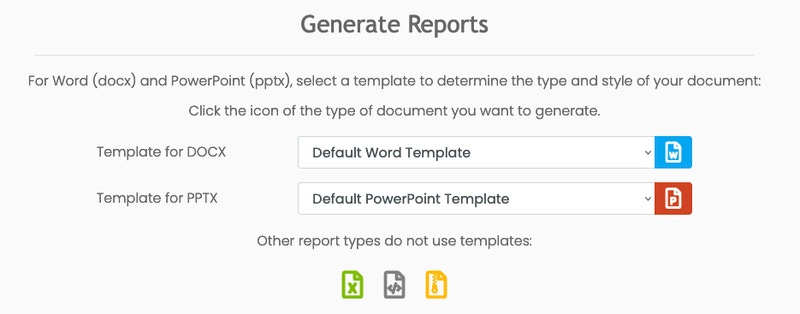
While viewing a report, scroll down to the **Generate Reports** section to configure your report and select the type of report you want.
 ### JSON
The JSON output is the foundation of every other report type. It is surfaced as a report type to enable users to take it and create custom reports and visualizations.
Example Report JSON
```json ExampleJSONReport.json theme={"system"}
{
"client": {
"id": 1,
"full_name": "Kabletown",
"short_name": "KT",
"codename": "SCHEMING RANGER",
"poc": {
"1": {
"id": 1,
"name": "John Francis Donaghy",
"job_title": "Vice President of East Coast Television and Microwave Oven Programming",
"email": "jack@nbc.com",
"phone": "555-123-4556",
"note": "Goes by \"Jack.\""
},
}
},
"project": {
"id": 1,
"name": "Kabletown Penetration Test (GREATER THUNDER)",
"start_date": "2019-07-29",
"end_date": "2019-08-09",
"codename": "GREATER THUNDER",
"project_type": "Penetration Test",
"note": ""
},
"findings": {
"SMBv1 Remote Code Execution (CVE-2017-0143)": {
"id": 1,
"title": "SMBv1 Remote Code Execution (CVE-2017-0143)",
"severity": "High",
"affected_entities": "...",
"description": "...",
"impact": "...",
"recommendation": "...",
"replication_steps": "...",
"host_detection_techniques": "...",
"network_detection_techniques": "...",
"references": "...",
"evidence": {
"Enigma": {
"id": 5,
"friendly_name": "Enigma",
"uploaded_by": "admin",
"upload_date": "2019-08-04",
"description": "Captured while he was discovering a new 0-day, probably.",
"caption": "Matt Nelson, OSCP in the zone",
"url": "/media/evidence/1/matt_nelson.png",
"file_path": "evidence/1/matt_nelson.png"
}
}
},
},
"infrastructure": {
"domains": {
"1": {
"id": 1,
"name": "getghostwriter.io",
"activity": "Command and Control",
"operator": "admin",
"start_date": "2019-07-15",
"end_date": "2019-08-09",
"note": "Used with Covenant C2."
}
},
"servers": {
"static": {
"1": {
"id": 1,
"ip_address": "159.89.234.80",
"activity": "Command and Control",
"role": "Team Server / C2 Server",
"operator": "benny",
"start_date": "2019-07-29",
"end_date": "2019-08-09",
"note": "Used for Covenant C2."
}
},
"cloud": {
"1": {
"id": 1,
"ip_address": "255.255.255.123",
"activity": "Phishing",
"role": "SMTP",
"operator": "benny",
"note": ""
},
},
},
"domains_and_servers": {
"1": {
"domain": "code.getghostwriter.io",
"servers": "255.255.255.123",
"cdn_endpoint": "ghost-cdn.azureedge.net"
},
}
},
"team": {
"1": {
"id": 1,
"name": "Benny Ghostwriter",
"project_role": "Assessment Lead",
"email": "benny@ghostwriter.wiki",
"start_date": "2019-07-29",
"end_date": "2019-08-09",
"note": "..."
},
}
}
```
### Office Documents
Microsoft Office is ubiquitous and a staple of many reporting workflows. To that end, Ghostwriter's reporting engine supports the construction and export of all three major Office file types: Word documents, Excel spreadsheets, and PowerPoint slide decks.
You can customize each of these, so the exported files fit your specific needs.
#### Word Documents
For Word, Ghostwriter renders a *docx* file using the JSON data and a report template. Review the Word section for more information on customization options and how to get started generating Word documents.
#### PowerPoint Slide Decks
For PowerPoint, Ghostwriter renders a *pptx* file using the JSON data and a slide deck master. Review the PowerPoint section for more information on customization options and how to get started generating slide decks.
#### Excel Spreadsheets
For Excel, Ghostwriter renders an *xlsx* file using the JSON data. Review the Excel section for more information on customization options.
### JSON
The JSON output is the foundation of every other report type. It is surfaced as a report type to enable users to take it and create custom reports and visualizations.
Example Report JSON
```json ExampleJSONReport.json theme={"system"}
{
"client": {
"id": 1,
"full_name": "Kabletown",
"short_name": "KT",
"codename": "SCHEMING RANGER",
"poc": {
"1": {
"id": 1,
"name": "John Francis Donaghy",
"job_title": "Vice President of East Coast Television and Microwave Oven Programming",
"email": "jack@nbc.com",
"phone": "555-123-4556",
"note": "Goes by \"Jack.\""
},
}
},
"project": {
"id": 1,
"name": "Kabletown Penetration Test (GREATER THUNDER)",
"start_date": "2019-07-29",
"end_date": "2019-08-09",
"codename": "GREATER THUNDER",
"project_type": "Penetration Test",
"note": ""
},
"findings": {
"SMBv1 Remote Code Execution (CVE-2017-0143)": {
"id": 1,
"title": "SMBv1 Remote Code Execution (CVE-2017-0143)",
"severity": "High",
"affected_entities": "...",
"description": "...",
"impact": "...",
"recommendation": "...",
"replication_steps": "...",
"host_detection_techniques": "...",
"network_detection_techniques": "...",
"references": "...",
"evidence": {
"Enigma": {
"id": 5,
"friendly_name": "Enigma",
"uploaded_by": "admin",
"upload_date": "2019-08-04",
"description": "Captured while he was discovering a new 0-day, probably.",
"caption": "Matt Nelson, OSCP in the zone",
"url": "/media/evidence/1/matt_nelson.png",
"file_path": "evidence/1/matt_nelson.png"
}
}
},
},
"infrastructure": {
"domains": {
"1": {
"id": 1,
"name": "getghostwriter.io",
"activity": "Command and Control",
"operator": "admin",
"start_date": "2019-07-15",
"end_date": "2019-08-09",
"note": "Used with Covenant C2."
}
},
"servers": {
"static": {
"1": {
"id": 1,
"ip_address": "159.89.234.80",
"activity": "Command and Control",
"role": "Team Server / C2 Server",
"operator": "benny",
"start_date": "2019-07-29",
"end_date": "2019-08-09",
"note": "Used for Covenant C2."
}
},
"cloud": {
"1": {
"id": 1,
"ip_address": "255.255.255.123",
"activity": "Phishing",
"role": "SMTP",
"operator": "benny",
"note": ""
},
},
},
"domains_and_servers": {
"1": {
"domain": "code.getghostwriter.io",
"servers": "255.255.255.123",
"cdn_endpoint": "ghost-cdn.azureedge.net"
},
}
},
"team": {
"1": {
"id": 1,
"name": "Benny Ghostwriter",
"project_role": "Assessment Lead",
"email": "benny@ghostwriter.wiki",
"start_date": "2019-07-29",
"end_date": "2019-08-09",
"note": "..."
},
}
}
```
### Office Documents
Microsoft Office is ubiquitous and a staple of many reporting workflows. To that end, Ghostwriter's reporting engine supports the construction and export of all three major Office file types: Word documents, Excel spreadsheets, and PowerPoint slide decks.
You can customize each of these, so the exported files fit your specific needs.
#### Word Documents
For Word, Ghostwriter renders a *docx* file using the JSON data and a report template. Review the Word section for more information on customization options and how to get started generating Word documents.
#### PowerPoint Slide Decks
For PowerPoint, Ghostwriter renders a *pptx* file using the JSON data and a slide deck master. Review the PowerPoint section for more information on customization options and how to get started generating slide decks.
#### Excel Spreadsheets
For Excel, Ghostwriter renders an *xlsx* file using the JSON data. Review the Excel section for more information on customization options.