> ## Documentation Index
> Fetch the complete documentation index at: https://www.ghostwriter.wiki/llms.txt
> Use this file to discover all available pages before exploring further.
# Generating Attack Path Narrative Outlines
> Build a narrative outline from operation log entries
Ghostwriter can generate a narrative outline from an operation log and append it directly to a report's
rich text field. This helps operators leverage log entries to kickstart their work on attack path narratives.
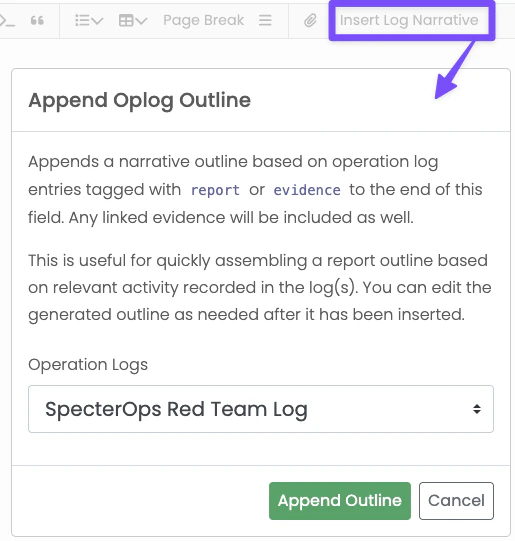 When you click the outline button in a report field, Ghostwriter opens a small dialog that lets you
choose which operation log to use. After you confirm, Ghostwriter appends one line per matching entry to
the end of the field.
Ghostwriter always includes entries tagged `report` or `evidence`. Administrators can also configure
additional tags in **Global Report Configuration** with the **Outline Tags** setting.
## Configuring Narrative Outline Tags
The **Outline Tags** setting accepts a comma-separated list of include rules:
* Exact tag matches like `report`, `evidence`, or `credentials`
* Wildcard prefix matches like `cred*` or `detect*` that match entries like `creds` or `detection`
* Namespaced prefix shorthand like `att&ck:`
Matching is case-insensitive, so `CREDENTIAL`, `credential`, and `Credential` are treated the same.
### Examples
* `report,evidence,credential` includes entries tagged exactly with `report`, `evidence`, or `credential`
* `report,evidence,cred*` includes `cred`, `creds`, `credential`, and `credentials`
* `report,evidence,detect*` includes `detect` and `detection`
* `report,evidence,att&ck:` includes any tag that starts with `att&ck:`
Ghostwriter treats the list as include-only. An entry is included in the outline if it matches **any**
configured rule.
## What the Outline Includes
For each matching entry, Ghostwriter:
* Sorts entries by start date and
* Formats timestamps in UTC
* Uses the default Ghostwriter date format for the date presentation
* Falls back to `N/A` when key fields are blank
* Appends linked evidence objects with references after the narrative line
Because the generated content is appended to the field, users can click the button multiple times if needed.
Ghostwriter does not remove previous outline content automatically.
When you click the outline button in a report field, Ghostwriter opens a small dialog that lets you
choose which operation log to use. After you confirm, Ghostwriter appends one line per matching entry to
the end of the field.
Ghostwriter always includes entries tagged `report` or `evidence`. Administrators can also configure
additional tags in **Global Report Configuration** with the **Outline Tags** setting.
## Configuring Narrative Outline Tags
The **Outline Tags** setting accepts a comma-separated list of include rules:
* Exact tag matches like `report`, `evidence`, or `credentials`
* Wildcard prefix matches like `cred*` or `detect*` that match entries like `creds` or `detection`
* Namespaced prefix shorthand like `att&ck:`
Matching is case-insensitive, so `CREDENTIAL`, `credential`, and `Credential` are treated the same.
### Examples
* `report,evidence,credential` includes entries tagged exactly with `report`, `evidence`, or `credential`
* `report,evidence,cred*` includes `cred`, `creds`, `credential`, and `credentials`
* `report,evidence,detect*` includes `detect` and `detection`
* `report,evidence,att&ck:` includes any tag that starts with `att&ck:`
Ghostwriter treats the list as include-only. An entry is included in the outline if it matches **any**
configured rule.
## What the Outline Includes
For each matching entry, Ghostwriter:
* Sorts entries by start date and
* Formats timestamps in UTC
* Uses the default Ghostwriter date format for the date presentation
* Falls back to `N/A` when key fields are blank
* Appends linked evidence objects with references after the narrative line
Because the generated content is appended to the field, users can click the button multiple times if needed.
Ghostwriter does not remove previous outline content automatically.