> ## Documentation Index
> Fetch the complete documentation index at: https://www.ghostwriter.wiki/llms.txt
> Use this file to discover all available pages before exploring further.
# Monitoring Domains
> Performing health checkups on domain names
## Domain Health Checks
Ghostwriter grades a domain's health as **Healthy** or **Burned**. Health is based on domain categorization and VirusTotal information.
### Categorization Health
Domain categories are pulled from VirusTotal, which pulls categorization information from multiple sources. See the VirusTotal configuration for more information.
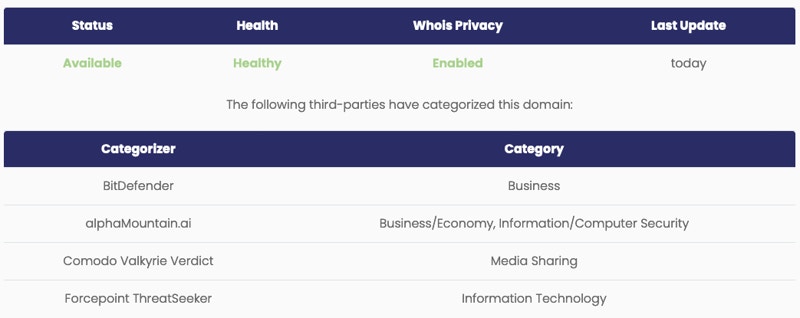
Categorization data is stored as *jsonb* in the `categorization` field. The format is:
```bash theme={"system"}
{
"VENDOR": "CATEGORY",
"VENDOR": "CATEGORY",
...
}
```
This JSON data is displayed as a table under each domain's *Health* tab:
 Ghostwriter assumes these categories are bad, and any source flagging a domain with one of these categories will trigger the health status to flip to **Burned**:
* spam
* adult/mature content
* extreme
* gambling
* hacking
* malicious outbound data/botnets
* malicious sources
* malicious sources/malnets
* malware repository
* nudity
* phishing
* placeholders
* pornography
* potentially unwanted software
* scam/questionable/illegal
* spam
* spyware and malware
* suspicious
* violence/hate/racism
* weapons
* web ads/analytic
Most of these categories are self-explanatory, but some — like gambling — may not seem like they belong.
* **Placeholders:** This often appears when a domain's category is undetermined. It translates to *Uncategorized* and may mean the domain is under review.
* **Gambling:** Not malicious, but likely blocked in a corporate environment.
If a domain is flagged as **Burned** it may still be recoverable. If you have a domain you like, it may be worth getting it recategorized and continuing to monitor its reputation to determine if it can be used after a cool-off period.
## Domain DNS Updates
You can also track the current DNS records for your domain names. Ghostwriter pulls this information using DNS queries.
These queries will not return subdomain records. You will have to manually track subdomains or use your registrar's API (if available) to pull these records.
You can edit or add tasks to *tasks.py* to leverage an API.
## Queuing Domain Updates
Scheduling these tasks will keep records up-to-date without requiring any user interaction.
Domain update tasks exist in the `tasks.py`. These functions can be scheduled or requested manually.
The **Domain Update Control Panel** lives at `/shepherd/update` and provides information on when the updates were last run, how long they took to complete, and their exit state (success or error messages).
Ghostwriter assumes these categories are bad, and any source flagging a domain with one of these categories will trigger the health status to flip to **Burned**:
* spam
* adult/mature content
* extreme
* gambling
* hacking
* malicious outbound data/botnets
* malicious sources
* malicious sources/malnets
* malware repository
* nudity
* phishing
* placeholders
* pornography
* potentially unwanted software
* scam/questionable/illegal
* spam
* spyware and malware
* suspicious
* violence/hate/racism
* weapons
* web ads/analytic
Most of these categories are self-explanatory, but some — like gambling — may not seem like they belong.
* **Placeholders:** This often appears when a domain's category is undetermined. It translates to *Uncategorized* and may mean the domain is under review.
* **Gambling:** Not malicious, but likely blocked in a corporate environment.
If a domain is flagged as **Burned** it may still be recoverable. If you have a domain you like, it may be worth getting it recategorized and continuing to monitor its reputation to determine if it can be used after a cool-off period.
## Domain DNS Updates
You can also track the current DNS records for your domain names. Ghostwriter pulls this information using DNS queries.
These queries will not return subdomain records. You will have to manually track subdomains or use your registrar's API (if available) to pull these records.
You can edit or add tasks to *tasks.py* to leverage an API.
## Queuing Domain Updates
Scheduling these tasks will keep records up-to-date without requiring any user interaction.
Domain update tasks exist in the `tasks.py`. These functions can be scheduled or requested manually.
The **Domain Update Control Panel** lives at `/shepherd/update` and provides information on when the updates were last run, how long they took to complete, and their exit state (success or error messages).
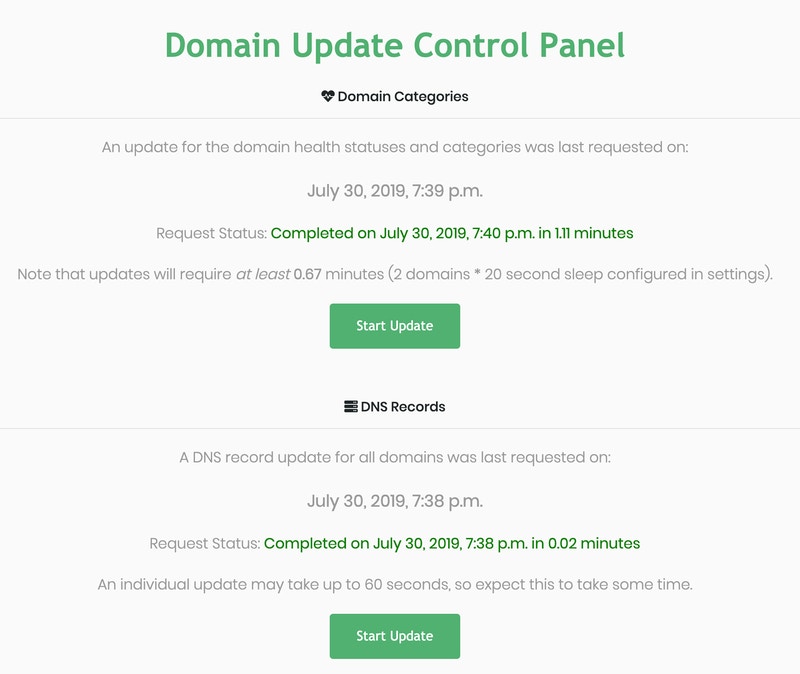 Click the **Start Update** button under the desired check to queue a check for *all domains*.
To update domain information or DNS records for just a single domain, open the domain's details and expand the **Health and Categories** or **DNS Records** panes.
Each of these panes contains a **Refresh** button. Click this button to queue an update for just the one domain.
Click the **Start Update** button under the desired check to queue a check for *all domains*.
To update domain information or DNS records for just a single domain, open the domain's details and expand the **Health and Categories** or **DNS Records** panes.
Each of these panes contains a **Refresh** button. Click this button to queue an update for just the one domain.