> ## Documentation Index
> Fetch the complete documentation index at: https://www.ghostwriter.wiki/llms.txt
> Use this file to discover all available pages before exploring further.
# Viewing & Managing BloodHound Data
> How to view and manage your BloodHound data
An overview of the BloodHound data is available under your Project dashboard. If you have a global server or project server configured,
you will see the *BloodHound* tab on the dashboard. This tab will show you the configured server's URL and has buttons for testing the
connection and fetching the latest data.
When a project does not have its own BloodHound API settings, the dashboard falls back to the shared global BloodHound
configuration only when an admin has enabled *Allow Projects to Use Shared Configuration*. In that case, the project
view identifies that it is using the shared configuration and the cached results from that shared server.
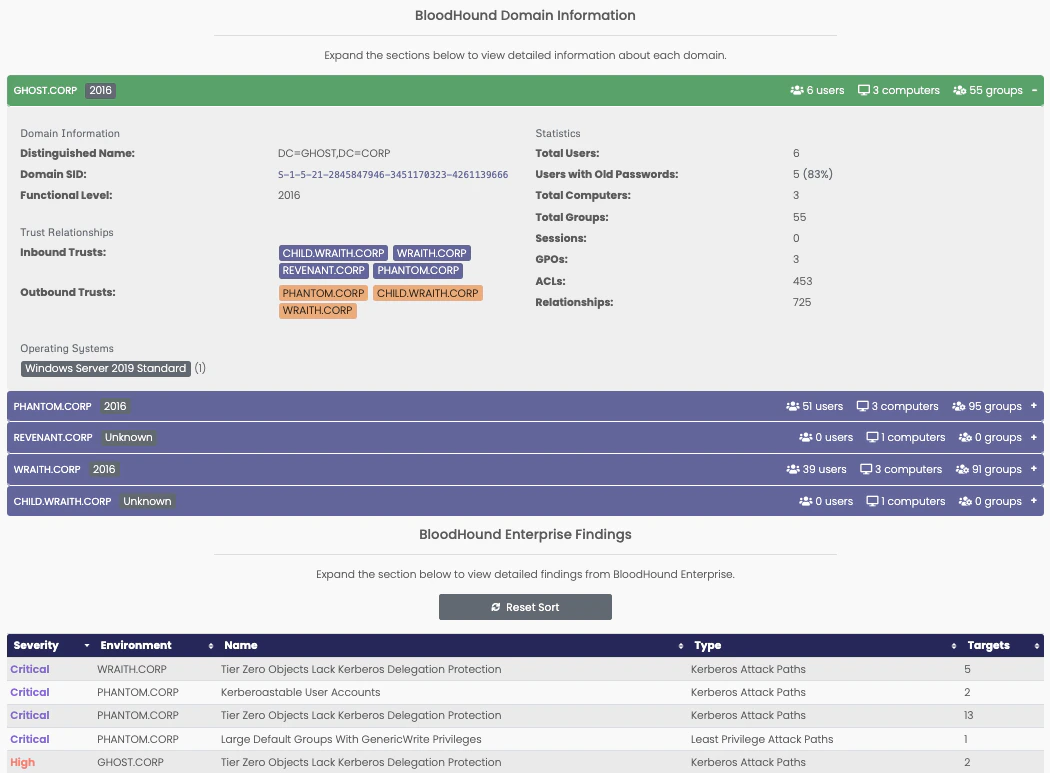
Once Ghostwriter has data, you will see one or more expandable sections. The *Domains* section shows an overview of the collected domains
data. If the configured server is a BHE server, you will also see a *Findings* section with an overview of the BHE findings.
 ## Managing the Data
Project members can refresh project-specific BloodHound data at any time by clicking the *Fetch BloodHound Data* button.
That will kick-off the BloodHound connection that retrieves the latest data from the configured server. This process can
take a few minutes to complete. A toast notification will appear to let you know the fetch was successful and instructing
you to refresh the page to see the new data.
The shared global BloodHound configuration is intended to be managed through the admin configuration page. If you use a
shared global server, keep in mind that its configuration and cached results are reused across projects that rely on that
fallback.
## Managing the Data
Project members can refresh project-specific BloodHound data at any time by clicking the *Fetch BloodHound Data* button.
That will kick-off the BloodHound connection that retrieves the latest data from the configured server. This process can
take a few minutes to complete. A toast notification will appear to let you know the fetch was successful and instructing
you to refresh the page to see the new data.
The shared global BloodHound configuration is intended to be managed through the admin configuration page. If you use a
shared global server, keep in mind that its configuration and cached results are reused across projects that rely on that
fallback.