> ## Documentation Index
> Fetch the complete documentation index at: https://www.ghostwriter.wiki/llms.txt
> Use this file to discover all available pages before exploring further.
# Accessing BloodHound Data in Reports
> How to access the data in your report templates
Accessing the data in your report template is simple. Everything is inside the `bloodhound` key in the report context.
You can preview this by looking at the JSON report data.
Inside the `bloodhound` key, you will find a `domains` key and, if it's BloodHound ENterprise data, a `findings` key.
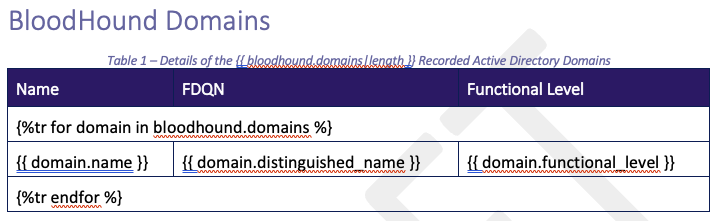
For example, you can iterate over the domains to create a table like so
```jinja2 theme={"system"}
{%tr for domain in bloodhound.domains %}
{{ domain.name }} {{ domain.distinguished_name }} {{ domain.functional_level }}
{%tr endfor %}
```
 ## Report Filters for BloodHound Data
| **Filter** | **Usage** |
| ---------------------------------------------- | ---------------------------------------------------------------------------------------------------------------------------------------- |
| `translate_domain_sid(SID, domains)` | Accepts the `bloodhound.domains` `dict` and a SID to translate the SID to a domain name. |
| `filter_bhe_findings_by_domain(findings, SID)` | Accepts the `bloodhound.findings` `dict` and a SID to return only findings for that domain SID (based on the findings `environment_id`.) |
## Report Filters for BloodHound Data
| **Filter** | **Usage** |
| ---------------------------------------------- | ---------------------------------------------------------------------------------------------------------------------------------------- |
| `translate_domain_sid(SID, domains)` | Accepts the `bloodhound.domains` `dict` and a SID to translate the SID to a domain name. |
| `filter_bhe_findings_by_domain(findings, SID)` | Accepts the `bloodhound.findings` `dict` and a SID to return only findings for that domain SID (based on the findings `environment_id`.) |